In thi article , We will learn How to create 3D Rotating Image Gallery with CSS. You can use 3D rotating Gallery make your web portal more dynamic and attractive. With 3D transforms,you can make simple elements more interesting by…
Expand +Category: Web Designing
How to Create Bootstrap Carousel Slider
In this article we will learn “How to create Bootstrap Carousel slider” with different types of carousel functionality. There are lot’s of jQuery slidershow plugins are available to create crousel slider for cycling through elements. If web application uses Bootstrap…
Expand +Create HTML5 Fullscreen Video Background Using CSS
In this article, i will show you how to add static video in background of html section using css. It is a very easy and simple script to add video background on loading page. In this article i am using…
Expand +Facebook style timeline content loading placeholder with CSS
In this article, we’ll get the knowledge about Facebook timeline placeholder style using CSS. Many times you have noticed that when you open facebook on your system, you will get content loading placeholder and you always think how that placeholder…
Expand +Jquery for Datetime Picker
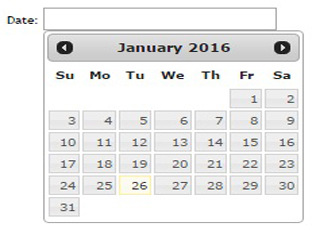
Hello, In this post we will learn jquery script for date time picker at textbox of any project in which we want to use select dateTime option.
|
2 3 4 5 6 7 8 9 10 11 12 13 14 15 16 17 18 19 20 21 22 |
<!doctype html> <html lang="en"> <head> <meta charset="utf-8"> <title>Datetime Picker</title> <link rel="stylesheet" href="//code.jquery.com/ui/1.11.4/themes/smoothness/jquery-ui.css"> <script src="//code.jquery.com/jquery-1.10.2.js"></script> <script src="//code.jquery.com/ui/1.11.4/jquery-ui.js"></script> <link rel="stylesheet" href="/resources/demos/style.css"> <script> $(function() { $( "#datepicker" ).datepicker(); }); </script> </head> <body> <p>Date: <input type="text" id="datepicker" style="width:100px;"></p> </body> </html> |
How to create first HTML Page
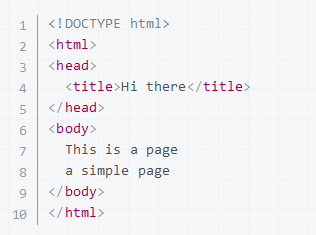
step-1: First, Open your text editor and create a new text file, then type something like this:
|
2 3 4 5 6 7 8 9 10 11 12 13 |
<!DOCTYPE html> <html> <head> <title>Hi there</title> </head> <body> This is a page a simple page </body> </html> |
Step-2: After this save the page like: my_page.html Step-3: find the file you just created and open it with your browser (double-click,…
Expand +