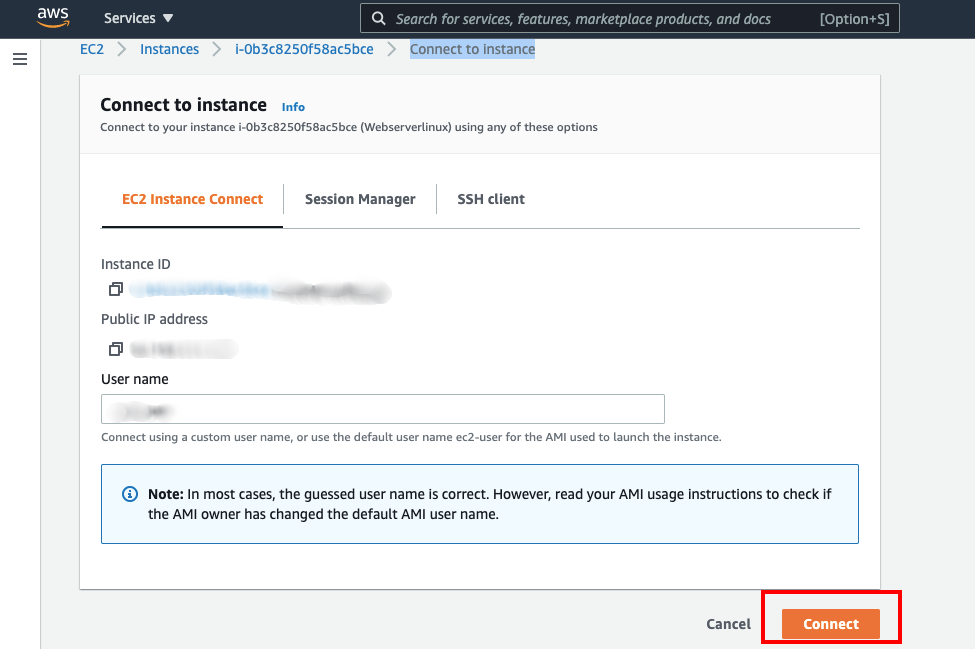
In this article, I’m going to tell you how to install PHP 7.4 or 7.3 or 7.2 on aws EC2 instance. To do that you need to first set up an EC2 instance. Once you have done with EC2 instance creation, you need connect your EC2 instance console using SSH or EC2 Management console.
Connect your EC2 instance
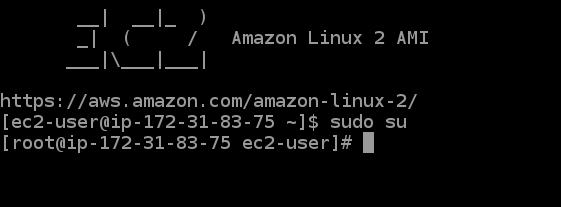
you need to update your privileges to root user (sudo su) before installing the PHP.
let’s install PHP into the EC2 instance
Install the Apache web server.
$ yum install httpd -yCheck the server running status
$ service httpd statusIf you found server is inactive then start the web server with the command shown following.
$ service httpd startNow copy your EC2 Instance Public DNS something like: ec2-54-xxx-xxx-xxx.compute-1.amazonaws.com and paste it on your browser to check apache server is running or not.
Install PHP 7.4 on server
Confirm that the amazon-linux-extras package is installed:
$ which amazon-linux-extras

/usr/bin/amazon-linux-extras
If the command doesn’t return any output, then install the package that will configure the repository:
$ sudo yum install -y amazon-linux-extrasInstall PHP 7.4, 7.3, 7.2 on Amazon AWS EC2
Let’s confirm that PHP 7.x topic is available in our AWS EC2 machine:
$ sudo  amazon-linux-extras | grep php
NOTE: The livepatch extra is in public preview, not meant for production use

 15  php7.2                   available    \
 17  lamp-mariadb10.2-php7.2  available    \
 31  php7.3                   available    \
 42  php7.4                   available    [ =stable
As we can see all PHP 7 topics, in this example we’ll enable php7.4 topic.
$ sudo amazon-linux-extras enable php7.4Now install PHP packages from the repository.
$ sudo yum clean metadata
$ sudo yum install php php-{pear,cgi,common,curl,mbstring,gd,mysqlnd,gettext,bcmath,json,xml,fpm,intl,zip,imap}
Accept installation of PHP 7 packages on AWS EC2.
Dependencies Resolved

========================================================================================================================================================
 Package                                Arch                      Version                                    Repository                            Size
========================================================================================================================================================
Installing:
 php                                    x86_64                    7.4.5-1.amzn2                              amzn2extra-php7.4                    3.2 M
 php-bcmath                             x86_64                    7.4.5-1.amzn2                              amzn2extra-php7.4                     68 k
 php-cli                                x86_64                    7.4.5-1.amzn2                              amzn2extra-php7.4                    4.9 M
 php-common                             x86_64                    7.4.5-1.amzn2                              amzn2extra-php7.4                    1.1 M
 php-fpm                                x86_64                    7.4.5-1.amzn2                              amzn2extra-php7.4                    1.7 M
 php-gd                                 x86_64                    7.4.5-1.amzn2                              amzn2extra-php7.4                    180 k
 php-intl                               x86_64                    7.4.5-1.amzn2                              amzn2extra-php7.4                    221 k
 php-json                               x86_64                    7.4.5-1.amzn2                              amzn2extra-php7.4                     70 k
 php-mbstring                           x86_64                    7.4.5-1.amzn2                              amzn2extra-php7.4                    511 k
 php-mysqlnd                            x86_64                    7.4.5-1.amzn2                              amzn2extra-php7.4                    238 k
 php-pear                               noarch                    1:1.10.7-3.amzn2.0.1                       amzn2-core                           354 k
 php-xml                                x86_64                    7.4.5-1.amzn2                              amzn2extra-php7.4                    198 k
Installing for dependencies:
 apr                                    x86_64                    1.6.3-5.amzn2.0.2                          amzn2-core                           118 k
 apr-util                               x86_64                    1.6.1-5.amzn2.0.2                          amzn2-core                            99 k
 apr-util-bdb                           x86_64                    1.6.1-5.amzn2.0.2                          amzn2-core                            19 k
 generic-logos-httpd                    noarch                    18.0.0-4.amzn2                             amzn2-core                            19 k
 httpd                                  x86_64                    2.4.43-1.amzn2                             amzn2-core                           1.3 M
 httpd-filesystem                       noarch                    2.4.43-1.amzn2                             amzn2-core                            23 k
 httpd-tools                            x86_64                    2.4.43-1.amzn2                             amzn2-core                            87 k
 libxslt                                x86_64                    1.1.28-5.amzn2.0.2                         amzn2-core                           243 k
 libzip                                 x86_64                    1.3.2-1.amzn2.0.1                          amzn2-core                            62 k
 mailcap                                noarch                    2.1.41-2.amzn2                             amzn2-core                            31 k
 mod_http2                              x86_64                    1.15.3-2.amzn2                             amzn2-core                           146 k
 oniguruma                              x86_64                    5.9.6-1.amzn2.0.3                          amzn2-core                           127 k
 php-pdo                                x86_64                    7.4.5-1.amzn2                              amzn2extra-php7.4                    133 k
 php-process                            x86_64                    7.4.5-1.amzn2                              amzn2extra-php7.4                     88 k

Transaction Summary
========================================================================================================================================================
Install  12 Packages (+14 Dependent packages)

Total download size: 15 M
Installed size: 61 M
Is this ok [y/d/N]: y
Check default PHP version
$ php -v
PHP 7.4.15 (cli) (built: Feb 11 2021 17:53:39) ( NTS )
Copyright (c) The PHP Group
Zend Engine v3.4.0, Copyright (c) Zend Technologies
To install PHP 7.2, make sure you disable 7.4 and 7.3 then enable 7.2.
$ sudo amazon-linux-extras disable php7.4
$ sudo amazon-linux-extras disable php7.3
$ sudo amazon-linux-extras enable php7.2
$ sudo yum install php php-{pear,cgi,common,curl,mbstring,gd,mysqlnd,gettext,bcmath,json,xml,fpm,intl,zip,imap}
Confirm version of PHP
$ php -v
PHP 7.2.31 (cli) (built: Jul  2 2020 23:17:00) ( NTS )
Copyright (c) 1997-2018 The PHP Group
Zend Engine v3.2.0, Copyright (c) 1998-2018 Zend Technologies
Similar commands should be used when installing PHP 7.3 on Amazon AWS EC2.
Also Read: How to Import MySQL Database from SQL File using PHP
Conclusion:
Now we have installed PHP into our EC2 instance. Hope I was able to help someone out. If you have any questions feel free to ask anything on the comment section. Cheers!!.
Are you want to get implementation help, or modify or extend the functionality of this script? Submit a paid service request

Pradeep Maurya is the Professional Web Developer & Designer and the Founder of “Tutorials website”. He lives in Delhi and loves to be a self-dependent person. As an owner, he is trying his best to improve this platform day by day. His passion, dedication and quick decision making ability to stand apart from others. He’s an avid blogger and writes on the publications like Dzone, e27.co