In Angular, the decorator @ViewChild() is used to access a child component, directive, or DOM element within the parent component.
In certain cases, you may need to access a directive, child component, or DOM element from a parent component class. The ViewChild decorator returns the first element that matches the selector for a given directive, component, or template reference.
Use ViewChild with Child Component
ViewChild makes it possible to access a child component and call methods or access instance variables that are available to the child.
Let’s start, First we will create a ParentComponent and ChildComponent. Ideally, i will use @angular/cli to generate your component:
A. Generate Parent Component named “employee”
ng g c employeeB. Generate Child Component named “salary”
ng g c salaryOpen and Edit salary.component.ts file
Now, I will add salaryIncrement and salaryDecrement method to ChildComponent which returns a message:
import { Component, OnInit } from '@angular/core';

@Component({
  selector: 'app-salary',
  templateUrl: './salary.component.html',
  styleUrls: ['./salary.component.css']
})
export class SalaryComponent implements OnInit {

  empsalary:number=0;
  message:string='';
  constructor() { }

salaryIncrement(){
 this.empsalary=this.empsalary+500;
 this.message="Employee Incremented Salary: ";
}

salaryDecrement(){
  this.empsalary=this.empsalary-500;
  this.message="Employee Decremented Salary: "
}

  ngOnInit(): void {
  }

}
Next, I will edit the salary.component.html file and copy and paste the below code:
Open and Edit salary.component.html file
{{message}} {{empsalary}}
Next, I will open the parent component “employee.component.html” and update reference of child component selector to the parent component html file:
Open and Edit employee.component.html file
Employee Parent Component
In the above code, i added two button for increment and decrement the salary.
Also i added the child component reference using <app-salary></app-salary> in parent template.
Open and Edit employee.component.ts file
Next, i will open the “employee.component.ts” file and define the function for button click.
import { Component, OnInit, ViewChild } from '@angular/core';

@Component({
  selector: 'app-employee',
  templateUrl: './employee.component.html',
  styleUrls: ['./employee.component.css']
})
export class EmployeeComponent implements OnInit {

  constructor() { }

  increment(){
console.log("Salary Incremented");
  }
decrement(){
 console.log("Salary Decremented");
}

  ngOnInit(): void {
  }

}
In the above code, i only defined increment and decrement function which will trigger on button click and console the message.
Now, I will use ViewChild decorator in “employee.component.ts” file and use the increment and decrement function or method of child component “salary”.
Open and Edit employee.component.ts file again
import { Component, OnInit, ViewChild } from '@angular/core';
import { SalaryComponent } from '../salary/salary.component';

@Component({
  selector: 'app-employee',
  templateUrl: './employee.component.html',
  styleUrls: ['./employee.component.css']
})
export class EmployeeComponent implements OnInit {

@ViewChild(SalaryComponent) salaryComponent:SalaryComponent;


  constructor() { }
  increment(){
this.salaryComponent.salaryIncrement();
  }
decrement(){
 this.salaryComponent.salaryDecrement();
}

  ngOnInit(): void {
  }

}
Now, we can call the salaryIncrement and salaryDecrement method from within our parent component class with ViewChild like this:
Next, we will reference the employee component in our app template:
Open and edit app.component.html file
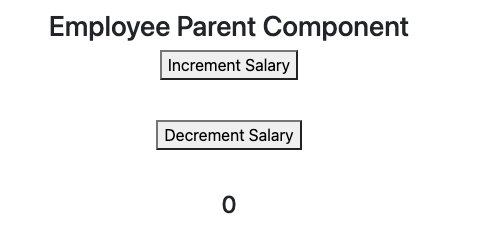
When I run the application and view the output in a browser, I get the following output
Output:
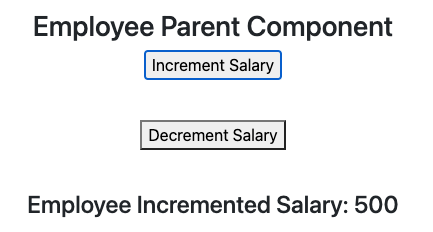
After click on increment button for first time, I get the following output.
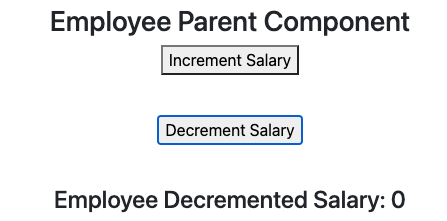
After click on decrement button for first time , I get the following output.
Conclusion
You have learned to use ViewChild decorator to access a child component from a parent component class.
Hope I was able to help someone out. If you have any questions feel free to ask anything on the comment section. Cheers!!.
Are you want to get implementation help, or modify or extend the functionality of this script? Submit a paid service request

Pradeep Maurya is the Professional Web Developer & Designer and the Founder of “Tutorials website”. He lives in Delhi and loves to be a self-dependent person. As an owner, he is trying his best to improve this platform day by day. His passion, dedication and quick decision making ability to stand apart from others. He’s an avid blogger and writes on the publications like Dzone, e27.co