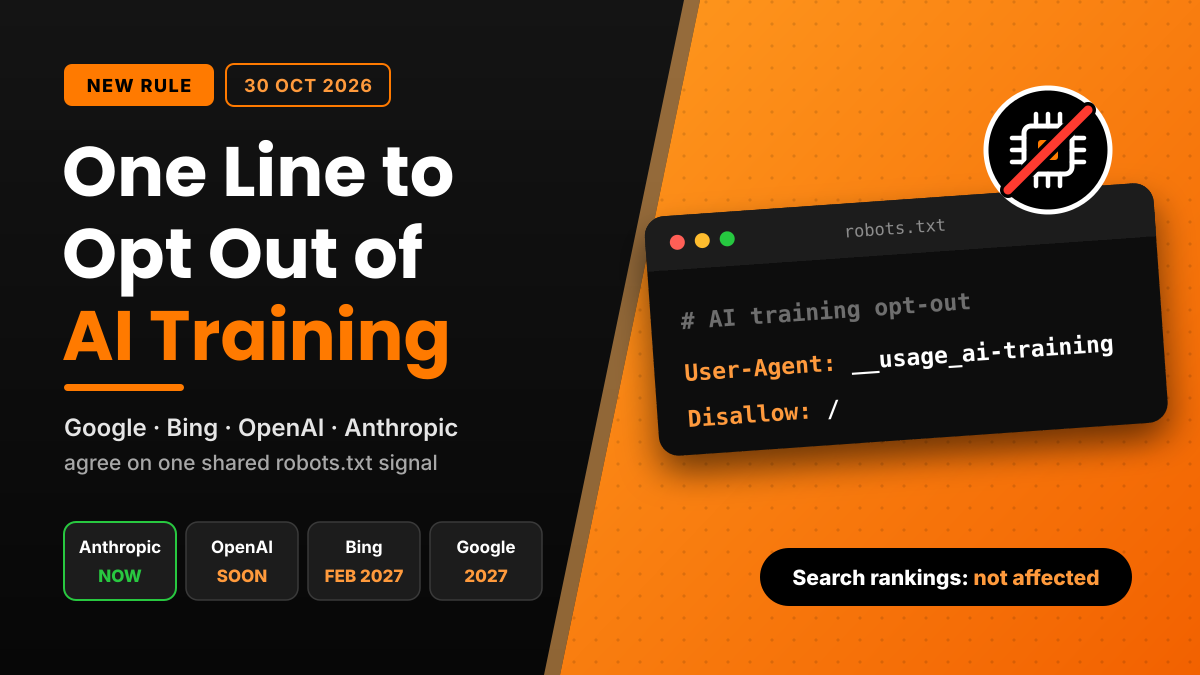
Until now, an AI training opt-out meant writing a separate robots.txt block for every AI company: Google-Extended for Gemini, GPTBot for OpenAI, ClaudeBot for Anthropic, and so on. That list keeps getting longer. On October 30, 2026, Google, Microsoft and OpenAI each published plans to support one shared signal instead. It is a single robots.txt group, keyed to a token called __usage_ai-training, that tells AI providers you don’t want your pages used to train models.
The proposal comes from an IETF Internet-Draft written by Kevin Kelley of Anthropic, and Anthropic says it has already started implementing it. Here is what the rule does, when each company will honour it, and how to add it to a WordPress, Shopify or Laravel site today.
Quick Facts
| Item | Details |
|---|---|
| Announced | October 30, 2026 |
| Token | __usage_ai-training |
| Spec | IETF draft “Machine-Readable Training Preference Signal” (draft-kelley-aipref-training-preference-signal-00) |
| Draft author | Kevin Kelley, Anthropic |
| Status | Individual Internet-Draft, not an IETF standard yet; expires May 3, 2027 |
| Aims to support it “along with other AI providers in 2027” | |
| Microsoft Bing | Honours it from February 1, 2027 |
| OpenAI | Said it will implement the signal in the coming months |
| Effect on search rankings | None, according to Google and Microsoft |
What Is the Shared AI Training Control?
robots.txt normally addresses crawlers by name. The new draft reuses that same format but puts a “policy token” in the User-Agent line instead of a bot name. Any AI provider that supports the draft reads the group and treats the Disallow paths as “don’t train on this.”
The draft’s own example looks like this:
User-Agent: __usage_ai-training
Disallow: /
Allow: /press-kit/
That says: no AI training on any page, except pages under /press-kit/. According to the draft’s abstract, it “introduces no new directive names and no new grammar.” Normal robots.txt rules from the Robots Exclusion Protocol (RFC 9309) still apply, including longest-match precedence. So Allow and Disallow work the way you already know.
One thing to understand early: this is a preference, not a lock. Only companies that choose to honour it will follow it. Search crawling also carries on as normal, because the rule just tells supporting providers how they may use what they collect.
Who Supports It and When
Google announced its plans in a Search Central blog post titled “Supporting a shared AI training control for websites.” The line most outlets quote is: “We aim to support this new control along with other AI providers in 2027.”
Google’s existing AI control is the Google-Extended token. As reported by ppc.land and others, if you use the new token and don’t write a separate Google-Extended rule, Google plans to treat it as if you had disallowed Google-Extended. Google-Extended also covers grounding in Gemini Apps. If you write an explicit Google-Extended allow rule, that rule wins for Google.
Microsoft Bing
Microsoft gave the most detail. Its Bing blog post (October 30, 2026, by Krishna Madhavan) confirms:
- December 15, 2026: Temporary grounding preferences open in Bing Webmaster Tools for sites that currently use
NoArchiveorNoCache. - February 1, 2027: “Microsoft will honor the new preferences as it crawls.”
- March 1, 2027:
NoArchiveandNoCachewill no longer be read as a training or grounding preference. If you relied on them, switch before this date. - September 30, 2027: The temporary preferences expire.
Bing also added page-level controls through a meta tag or HTTP header:
<meta name="Bingbot" content="ai-training:disallow">
<meta name="Bingbot" content="ai-grounding:disallow">
Microsoft says these preferences “do not change eligibility for traditional Bing search results.”
OpenAI and Anthropic
OpenAI published “Making it easier for websites to express AI training preferences” and said it plans to implement the signal in the coming months. It also said the new signal won’t replace its existing robots.txt controls, so GPTBot rules keep working. Anthropic’s support came through Kelley’s message to the IETF ai-control mailing list. He wrote that Anthropic “has already started implementing support for this draft.”
Will It Hurt Your Google or Bing Rankings?
No. Microsoft says plainly that the training and grounding preferences don’t affect eligibility for its normal search results, and that “Indexing and ranking pages in traditional search results is not grounding.” Google’s crawler documentation has long said Google-Extended “does not impact a site’s inclusion in Google Search.” The reporting so far says the plan doesn’t touch AI Overviews or AI Mode either. If those features matter to you, keep watching Google’s own documentation as support rolls out. Google’s guidance on AI-generated content is worth reading alongside this, since both shape how your pages appear in AI-driven search.
How to Add the AI Training Opt-Out to Your Site
You can add the rule today. Supporting crawlers will start reading it as each company switches it on. Keep your existing vendor rules (GPTBot, Google-Extended, ClaudeBot) in place until then.
Step 1: Check Your Current robots.txt
Open https://yourdomain.com/robots.txt in a browser. Note any existing AI-related groups so you don’t contradict them.
Step 2: WordPress
WordPress generates a virtual robots.txt unless you’ve uploaded a physical file. To add the group with code, use the robots_txt filter in a small custom plugin or your child theme’s functions.php:
php
<?php
add_filter( 'robots_txt', function ( $output, $public ) {
    if ( $public ) {
        $output .= "\nUser-Agent: __usage_ai-training\n";
        $output .= "Disallow: /\n";
    }
    return $output;
}, 10, 2 );
If an SEO plugin such as Yoast or Rank Math manages robots.txt for you, add the same two lines in its robots.txt editor instead. If a physical robots.txt file sits in your web root, edit that file. A physical file overrides the filter. While you’re in the dashboard, check that your core is current; our guide to the WordPress 7.1.3 security release walks through a safe update.
Step 3: Shopify
Shopify lets you customise robots.txt through a robots.txt.liquid template. In Online Store > Themes > Edit code, add a new template, choose robots.txt, keep the default groups loop, and append your group at the end:
liquid
{% for group in robots.default_groups %}
  {{- group.user_agent }}
  {%- for rule in group.rules -%}
    {{ rule }}
  {%- endfor -%}
  {%- if group.sitemap != blank -%}
    {{ group.sitemap }}
  {%- endif -%}
{% endfor %}

User-Agent: __usage_ai-training
Disallow: /
Leave Shopify’s default rules intact. They protect checkout and cart URLs. Shopify’s Help Center guide covers the editor steps, and if you’re new to editing theme code, our custom FAQ section tutorial for Shopify OS 2.0 shows how the code editor works.
Step 4: Laravel, PHP or Static Sites
Edit public/robots.txt (Laravel) or the robots.txt in your document root and add:
User-Agent: __usage_ai-training
Disallow: /
For Bing’s page-level header on specific routes, plain PHP is enough:
php
header( 'X-Robots-Tag: Bingbot: ai-training:disallow' );Step 5: Opt Out Selectively
Many Indian businesses want their product pages, blogs and FAQs to show up in AI answers, but don’t want paid courses, member areas or client documents used for training. robots.txt paths make that easy:
User-Agent: __usage_ai-training
Disallow: /members/
Disallow: /courses/
Everything else stays available. For an edtech site, a coaching institute or a SaaS company with gated docs, this middle path usually makes the most sense.
What This Means for Indian Website Owners
India has a huge base of content publishers: news portals in regional languages, coaching and edtech brands, D2C stores on Shopify, and agencies running hundreds of WordPress client sites. Until now, keeping an AI crawler list up to date across every client site was tedious and easy to get wrong. And as AI agents start browsing sites directly, it pays to know how they see your pages; try the Google Lighthouse AI agent test on your site. One shared rule cuts that work down.
If you’re an agency, add the token to your standard WordPress or Shopify launch checklist. Discuss it with each client first, because blocking AI training is a business decision, not a technical default. A brand that wants visibility in AI assistants may decide to allow training.
Key Takeaways
- Google, Microsoft and OpenAI announced plans on October 30, 2026 to support one shared AI training opt-out in robots.txt.
- The rule uses
User-Agent: __usage_ai-trainingwith normalDisallowandAllowpaths. - Bing honours it from February 1, 2027. Google is targeting 2027. OpenAI says “in the coming months.”
- Search rankings and normal indexing are not affected, according to Google’s and Microsoft’s documentation.
- Keep your existing GPTBot, Google-Extended and ClaudeBot rules until support is live.
- It’s still an individual IETF draft, so details could change.
FAQ
__usage_ai-training in robots.txt? It’s a policy token from an IETF draft. When you place it in a robots.txt User-Agent line, supporting AI providers read the Disallow paths in that group as pages you don’t want used for AI model training.
According to Microsoft and Google, no. The preference covers AI training, not indexing or ranking in normal search results.
Google says it aims to support the control in 2027. It hasn’t announced an exact date yet.
Not yet. OpenAI says the new signal won’t replace its existing controls, and Google still reads explicit Google-Extended rules. Keep both until each provider confirms support.
Need Help Setting This Up?
Want the AI training opt-out configured correctly across your WordPress, WooCommerce, Shopify or Laravel sites, without breaking SEO? I’ve built and maintained business websites for 13+ years. Get in touch with Pradeep for a quick robots.txt and technical SEO review.

Pradeep Maurya is the Professional Web Developer & Designer and the Founder of “Tutorials website”. He lives in Delhi and loves to be a self-dependent person. As an owner, he is trying his best to improve this platform day by day. His passion, dedication and quick decision making ability to stand apart from others. He’s an avid blogger and writes on the publications like Dzone, e27.co