Integrating a payment gateway is a crucial step for any online business that wants to accept payments securely. Cashfree is a popular payment gateway in India that allows businesses to collect payments online. This article will get the complete process to Integrate Cashfree Payment Gateway in your PHP-based application. Whether you are developing an e-commerce platform, a subscription service, or any other online business, this guide will help you set up a secure payment processing system using Cashfree.
Cashfree is one of the leading payment gateways in India, known for its reliability, speed, and comprehensive range of services. It supports multiple payment modes, including credit/debit cards, net banking, UPI, and popular wallets, making it a versatile choice for businesses.
Suggested Read: How to Integrate PhonePe Payment Gateway in PHP
A Step-by-Step Guide: Integrate Cashfree payment gateway to your PHP website
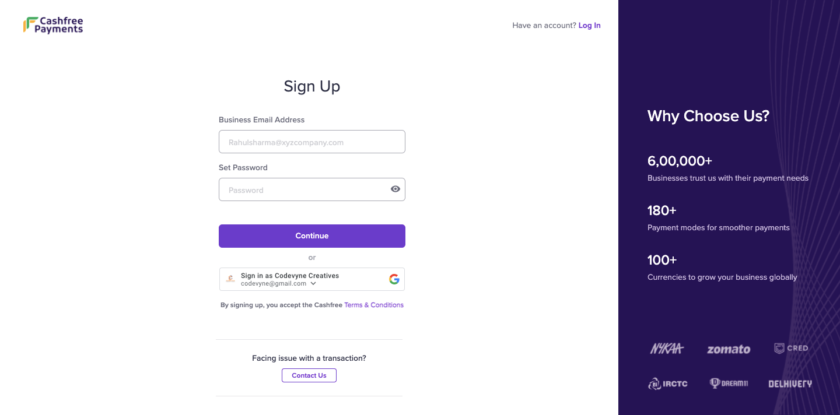
Step 1: Create a Cashfree account
If you don’t have an account, sign up for a Cashfree account at https://merchant.cashfree.com/merchants/signup
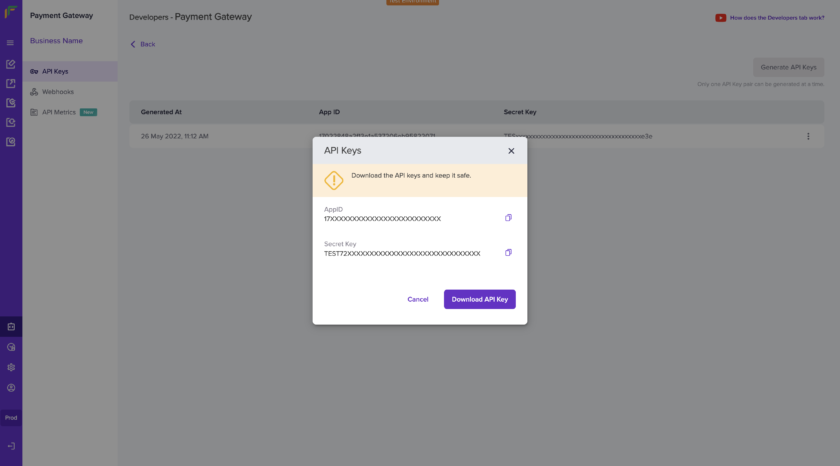
Step 2: Get API Keys
- Log in to your Cashfree Dashboard.
- Go to Payment Gateway Dashboard > and click on Developers> API Keys.
- Click API Keys under Payment Gateway.
- In test environment API keys will be auto-generated. In prod-environment you need to click on Generate API Keys
Obtain the API keys (App ID and Secret Key)
Also Read: Integrating Razorpay Payment Gateway in PHP
Step 3: Database Configuration & Create Table
Create a file named config.php to add database connection. Copy and paste the below code
/************** database configuration **************/
$host="localhost";
$dbName="database_name";
$dbUser="database_username";
$dbpass="db_password";

$con = mysqli_connect($host,$dbUser,$dbpass,$dbName);

// Check connection
if (mysqli_connect_errno()) {
  echo "Failed to connect to MySQL: " . mysqli_connect_error();
  exit();
}
Also create a table to insert payment details. Please use below code to create a table “cashfree_payment”
CREATE TABLE cashfree_payment (
  id int(255) NOT NULL,
  order_id varchar(255) COLLATE utf8_unicode_ci NOT NULL,
  order_amount varchar(255) COLLATE utf8_unicode_ci NOT NULL,
  customer_id varchar(255) COLLATE utf8_unicode_ci NOT NULL,
  customer_name varchar(255) COLLATE utf8_unicode_ci NOT NULL,
  customer_email varchar(255) COLLATE utf8_unicode_ci NOT NULL,
  customer_phone varchar(255) COLLATE utf8_unicode_ci NOT NULL,
  cf_order_id varchar(255) COLLATE utf8_unicode_ci NOT NULL,
  payment_session_id text COLLATE utf8_unicode_ci NOT NULL,
  payment_status varchar(255) COLLATE utf8_unicode_ci NOT NULL,
  payment_time varchar(255) COLLATE utf8_unicode_ci NOT NULL,
  callback_response text COLLATE utf8_unicode_ci NOT NULL,
  created_on timestamp NOT NULL DEFAULT CURRENT_TIMESTAMP ON UPDATE CURRENT_TIMESTAMP
) ENGINE=InnoDB DEFAULT CHARSET=utf8 COLLATE=utf8_unicode_ci;

ALTER TABLE cashfree_payment
  ADD PRIMARY KEY (id);

ALTER TABLE cashfree_payment
  MODIFY id int(255) NOT NULL AUTO_INCREMENT, AUTO_INCREMENT=1;
COMMIT;
Are you want to get implementation help, or modify or extend the functionality?
A Tutorialswebsite Expert can do it for you.
Step 4: Create your HTML form to get the customer details
Let’s create a bootstrap normal form to get customer information and amount details.
How to Integrate Cashfree payment gateway in PHP | tutorialswebsite.com Charge Rs.10 INR
Step 5: Generate Payment Request
Create a PHP script (pay.php) to handle the form submission and generate a payment request. You also need to replace your Cashfree API Key (App ID and Secret Key) details for test and production mode.
$APIURL,
CURLOPT_RETURNTRANSFER => true,
CURLOPT_ENCODING => '',
CURLOPT_MAXREDIRS => 10,
CURLOPT_TIMEOUT => 0,
CURLOPT_FOLLOWLOCATION => true,
CURLOPT_HTTP_VERSION => CURL_HTTP_VERSION_1_1,
CURLOPT_CUSTOMREQUEST => 'POST',
CURLOPT_POSTFIELDS =>'{
"order_id":"'.$orderId.'",
"order_amount": '.$orderAmount.',
"order_currency": "INR",
"customer_details": {
"customer_id": "'.$customer_id.'",
"customer_name": "'.$customer_name.'",
"customer_email": "'.$customer_email.'",
"customer_phone": "'.$customer_phone.'"
},
"order_meta": {
"return_url": "'.$base_url.'/success.php?order_id='.$orderId.'",
"notify_url":"'.$base_url.'/callback.php",
"payment_methods": "cc,dc,upi"
}
}',
CURLOPT_HTTPHEADER => array(
'X-Client-Secret: '.secret_key,
'X-Client-Id: '.client_id,
'Content-Type: application/json',
'Accept: application/json',
'x-api-version: 2023-08-01'
),
));
$response = curl_exec($curl);
curl_close($curl);
//echo $response;
$resData=json_decode($response);
if(isset($resData->cf_order_id) && $resData->cf_order_id !=''){
$cf_order_id=$resData->cf_order_id;
$order_id=$resData->order_id;
$payment_session_id=$resData->payment_session_id;
$paymentSessionId=$payment_session_id;
/***** insert payment details ***********/
//write your database insert query here
/******* end here **********/
}else{
echo $response;
}
?>
Confirm Your Details
Name : Email : Mobile No. : Pay Amount :
Payment request failed";
} ?>
In the above code you will get return_url work as redirect url after successful payment and notify_url will work as callback or webhook url to push or receive payment status in json format.
Related Article: How to Integrate PhonePe Payment Gateway in Laravel
Step-6: Handle Webhooks or Callback
You have to create callback.php file to handle asynchronous notifications from Cashfree. Copy and Paste below code
 'success']);
} else {
    // Invalid data
    http_response_code(400);
    echo json_encode(['status' => 'invalid data']);
}
?>
Step-7: Handle Payment Response
After a successful payment process, users will be redirected to a success page. In the pay.php file you will get return_url above, once you receive the success response, you’ll need to redirect the user to the success.php page.
Use the below success.php file code
    Payment Status


           Payment Status


         Payment Successfull!


            Order Id


                Thank you for your payment.


          Payment is failed.