



If you sell digital products or services on your WooCommerce store, this article is important for you. For virtual products, you don’t need shipping details. You can remove these extra fields to make the checkout faster and easier for your customers.
Here’s a simple guide to help you remove unnecessary checkout fields for virtual products in WooCommerce.
Suggested Read: WooCommerce: Changing VAT to GST on Cart/Checkout Page
Remove WooCommerce Checkout Fields for Virtual Products
It’s recommended to use a child theme and back up your site before making any changes to ensure you can recover if something goes wrong.
Default Checkout page

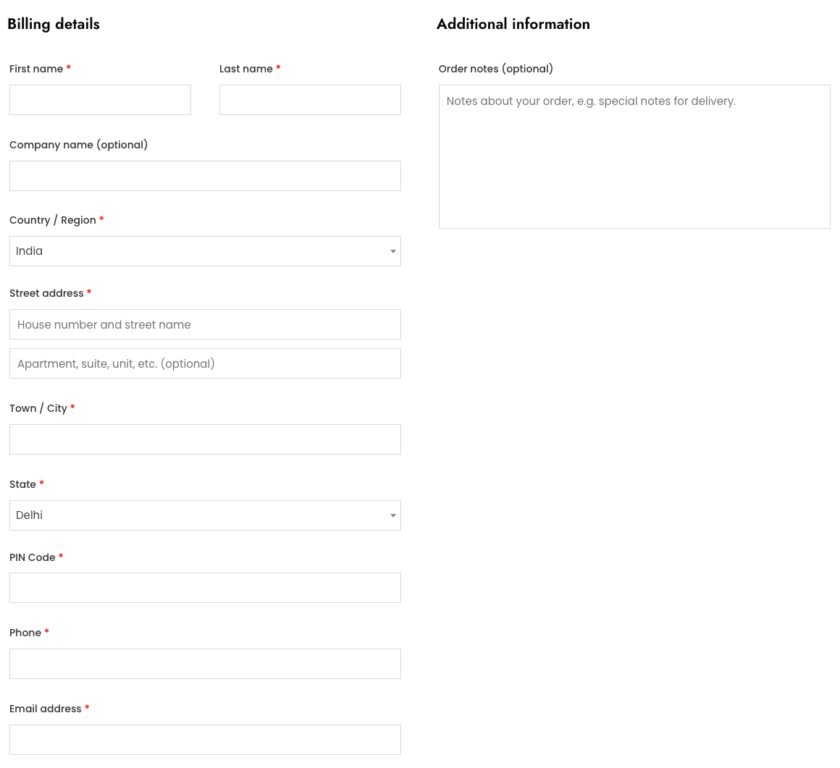
To get started, open and edit the functions.php file in your child theme folder. This file allows you to add custom code to change how your website works.
You can access this file through:
- The WordPress dashboard (under Appearance > Theme Editor).
- A file manager plugin.
- An FTP client to access your website’s files directly.
/** Remove and add dynamic field on checkout page**/
add_filter( 'woocommerce_checkout_fields', 'tutorialswebsite_checkout_virtual' );

function tutorialswebsite_checkout_virtual( $fields ) {

// Check if the cart contains only virtual products
    $is_virtual = true;
    foreach ( WC()->cart->get_cart() as $cart_item_key => $cart_item ) {
        if ( ! $cart_item['data']->is_virtual() ) {
            $is_virtual = false;
            break;
        }
    }

    // If all products in the cart are virtual, remove the fields
    if ( $is_virtual ) {
        // You can remove any field here, example below removes billing and shipping fields

        unset( $fields['billing']['billing_company'] );
        unset( $fields['billing']['billing_address_1'] );
        unset( $fields['billing']['billing_address_2'] );
        unset( $fields['billing']['billing_city'] );
        unset( $fields['billing']['billing_postcode'] );
        unset( $fields['billing']['billing_country'] );
        unset( $fields['billing']['billing_state'] );

        // If you have shipping fields and want to remove them as well
        unset( $fields['shipping']['shipping_first_name'] );
        unset( $fields['shipping']['shipping_last_name'] );
        unset( $fields['shipping']['shipping_company'] );
        unset( $fields['shipping']['shipping_address_1'] );
        unset( $fields['shipping']['shipping_address_2'] );
        unset( $fields['shipping']['shipping_city'] );
        unset( $fields['shipping']['shipping_postcode'] );
        unset( $fields['shipping']['shipping_country'] );
        unset( $fields['shipping']['shipping_state'] );

        // You can also remove order fields if necessary
        unset( $fields['order']['order_comments'] );

         add_filter( 'woocommerce_enable_order_notes_field', '__return_false' );
    }

    return $fields;


}
/** Remove and add dynamic field on checkout page**/
Are you want to get implementation help, or modify or extend the functionality?
A Tutorialswebsite Expert can do it for you.
How the Code Works
- Filter Hook: The woocommerce_checkout_fields filter hook lets you change the checkout fields.
- Check Virtual Products: The function tutorialswebsite_checkout_virtual goes through each item in the cart to see if all products are virtual. If any product is not virtual, it sets $is_virtual to false.
- Remove Fields: If all items are virtual, the code removes unnecessary billing and shipping fields, making the checkout process quicker and simpler.
After adding the code, save the functions.php file. Then, Go to your WooCommerce store, add virtual products to your cart, and proceed to the checkout page to see the changes.

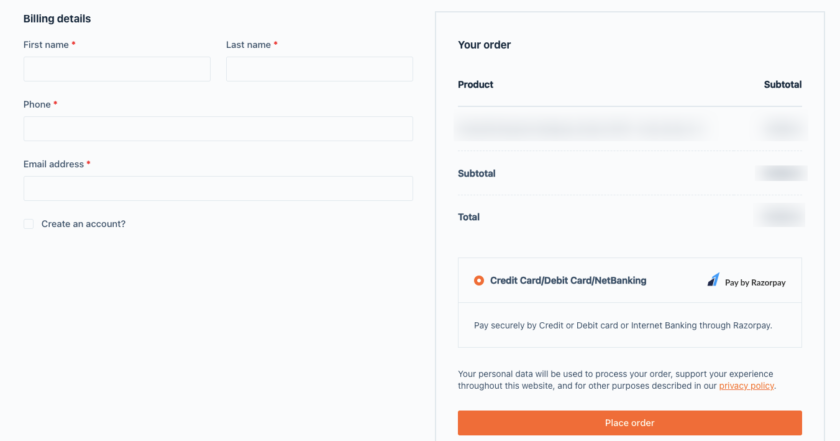
Conclusion
You can improve the speed and user interface of your WooCommerce store’s checkout process by removing unnecessary checkout fields for virtual products. This easy modification can improve customer experience and potentially increase your sales.
Thanks for reading 🙏, I hope you found the How to Remove Checkout Fields for Virtual Products in WooCommerce tutorial helpful for your project. Keep learning! If you face any problems – I am here to solve your problems.
FAQs
Removing unnecessary shipping fields simplifies the checkout process, making it faster and more user-friendly for your customers.
No, the changes only apply to virtual products. Physical products will still require the usual shipping details.
Yes, you can always edit your functions.php file again to revert the changes.
Yes, but it’s recommended to use a child theme and back up your site before making any changes to ensure you can recover if something goes wrong.
More Articles From WooCommerce
- How to check if a product is in a WooCommerce order
- WooCommerce: Display Product Discount After Coupon Applied in Cart Summary @ Checkout
- How to Get Best Selling Products in Woocommerce Programmatically
- How to Display Sale Price End Date in woocommerce


Pradeep Maurya is the Professional Web Developer & Designer and the Founder of “Tutorials website”. He lives in Delhi and loves to be a self-dependent person. As an owner, he is trying his best to improve this platform day by day. His passion, dedication and quick decision making ability to stand apart from others. He’s an avid blogger and writes on the publications like Dzone, e27.co