



Today, a website’s attractive design or flawless content may not be sufficient to draw in potential customers. The speed at which a site load is one of the criteria that Google’s algorithm takes into account when determining where a site will appear in the search results, therefore website owners need to be aware of this. Therefore, when a site loads in just a few seconds, internet users and search engines find it extremely slow.
According to statistics, approximately half of Internet users estimate that a website will load in two seconds or less. This needs to be taken care of, significantly since the results can be improved with little effort. There are multiple ways to speed up the loading of your website. Some of the ideas are quite simple and basic. A .htaccess file is one of the answers; it allows fast implementation of the basic site optimization.
What exactly is a .htaccess file?
A configuration file called .htaccess can be found in the root directory of Apache web servers.
It allows the user to have control over a specific folder or server item.
Also Read: Best Practices for Improving Web Application Security
We can change the configuration of the server application to turn specific server functionality and features either off or on using the .htaccess file.
Keeping in mind the goal of this article
For example, we can:
- improve the page loading speed
- optimize your site
- create a diversion (internal and external)
- create password-protected directories
- block specific IP
- and many more
Suggested Read: Tips to Boost Your WordPress Security
Speed Optimization using .htaccess file
Leverage Browser Caching
Enabling browser caching is one of the simplest ways to improve site speed and decrease server load. A visitor’s Computer may contain resources from your website page due to browser caching. This enables the visitor’s computer to pull the cached copy of the image or other sort of file, saving server load and bandwidth usage when they visit another page or come back to your site later.
There are basically two ways to configure browser caching. The first step is to set the cache time frame for each resource type using ExpiresByType. Applying the Cache-Control header is the second-best option.
ExpiresByType
Open your .htaccess file and copy and paste the below code
##### Optimize default expiration time - BEGIN

    ## Enable expiration control
    ExpiresActive On

    ## CSS and JS expiration: 1 week after request
    ExpiresByType text/css "now plus 1 week"
    ExpiresByType application/javascript "now plus 1 week"
    ExpiresByType application/x-javascript "now plus 1 week"

    ## Image files expiration: 1 month after request
    ExpiresByType image/bmp "now plus 1 month"
    ExpiresByType image/gif "now plus 1 month"
    ExpiresByType image/jpeg "now plus 1 month"
    ExpiresByType image/jp2 "now plus 1 month"
    ExpiresByType image/pipeg "now plus 1 month"
    ExpiresByType image/png "now plus 1 month"
    ExpiresByType image/svg+xml "now plus 1 month"
    ExpiresByType image/tiff "now plus 1 month"
    ExpiresByType image/x-icon "now plus 1 month"
    ExpiresByType image/ico "now plus 1 month"
    ExpiresByType image/icon "now plus 1 month"
    ExpiresByType text/ico "now plus 1 month"
    ExpiresByType application/ico "now plus 1 month"
    ExpiresByType image/vnd.wap.wbmp "now plus 1 month"

    ## Font files expiration: 1 week after request
    ExpiresByType application/x-font-ttf "now plus 1 week"
    ExpiresByType application/x-font-opentype "now plus 1 week"
    ExpiresByType application/x-font-woff "now plus 1 week"
    ExpiresByType font/woff2 "now plus 1 week"
    ExpiresByType image/svg+xml "now plus 1 week"

    ## Audio files expiration: 1 month after request
    ExpiresByType audio/ogg "now plus 1 month"
    ExpiresByType application/ogg "now plus 1 month"
    ExpiresByType audio/basic "now plus 1 month"
    ExpiresByType audio/mid "now plus 1 month"
    ExpiresByType audio/midi "now plus 1 month"
    ExpiresByType audio/mpeg "now plus 1 month"
    ExpiresByType audio/mp3 "now plus 1 month"
    ExpiresByType audio/x-aiff "now plus 1 month"
    ExpiresByType audio/x-mpegurl "now plus 1 month"
    ExpiresByType audio/x-pn-realaudio "now plus 1 month"
    ExpiresByType audio/x-wav "now plus 1 month"

    ## Movie files expiration: 1 month after request
    ExpiresByType application/x-shockwave-flash "now plus 1 month"
    ExpiresByType x-world/x-vrml "now plus 1 month"
    ExpiresByType video/x-msvideo "now plus 1 month"
    ExpiresByType video/mpeg "now plus 1 month"
    ExpiresByType video/mp4 "now plus 1 month"
    ExpiresByType video/quicktime "now plus 1 month"
    ExpiresByType video/x-la-asf "now plus 1 month"
    ExpiresByType video/x-ms-asf "now plus 1 month"

##### Optimize default expiration time - END
Cache-Control header
##### 1 Month for most static resources

    Header set Cache-Control "max-age=2592000, public"
Compress your site
Reducing the size of your website is another method for speeding it up. You may indeed decrease image size, file size, and file quantity. I strongly advise doing that. In addition, you can compress any files you send to the client’s browser. So, less information is transferred faster to your site.
The .htaccess file makes it simple to enable gzip. The following code will allow you to do this.
##### Enable gzip compression for resources

    mod_gzip_on Yes
    mod_gzip_dechunk Yes
    mod_gzip_item_include file .(html?|txt|css|js|php)$
    mod_gzip_item_include handler ^cgi-script$
    mod_gzip_item_include mime ^text/.*
    mod_gzip_item_include mime ^application/x-javascript.*
    mod_gzip_item_exclude mime ^image/.*
    mod_gzip_item_exclude rspheader ^Content-Encoding:.*gzip.*


# BEGIN DEFLATE COMPRESSION

# Compress HTML, CSS, JavaScript, Text, XML and fonts
 AddOutputFilterByType DEFLATE application/javascript
 AddOutputFilterByType DEFLATE application/rss+xml
 AddOutputFilterByType DEFLATE application/vnd.ms-fontobject
 AddOutputFilterByType DEFLATE application/x-font
 AddOutputFilterByType DEFLATE application/x-font-opentype
 AddOutputFilterByType DEFLATE application/x-font-otf
 AddOutputFilterByType DEFLATE application/x-font-truetype
 AddOutputFilterByType DEFLATE application/x-font-ttf
 AddOutputFilterByType DEFLATE application/x-javascript
 AddOutputFilterByType DEFLATE application/xhtml+xml
 AddOutputFilterByType DEFLATE application/xml
 AddOutputFilterByType DEFLATE font/opentype
 AddOutputFilterByType DEFLATE font/otf
 AddOutputFilterByType DEFLATE font/ttf
 AddOutputFilterByType DEFLATE image/svg+xml
 AddOutputFilterByType DEFLATE image/x-icon
 AddOutputFilterByType DEFLATE text/css
 AddOutputFilterByType DEFLATE text/html
 AddOutputFilterByType DEFLATE text/javascript
 AddOutputFilterByType DEFLATE text/plain
 AddOutputFilterByType DEFLATE text/xml

# END DEFLATE COMPRESSION

##### Or, compress certain file types by extension:

    SetOutputFilter DEFLATE
If you compress your site, be sure to use the Vary: Accept-Encoding HTTP header. Failing to do so can cause your site to fail if it is served through a CDN, firewall, or proxy.
##### Set Header Vary: Accept-Encoding


        Header append Vary: Accept-Encoding
Are you want to get implementation help, or modify or extend the functionality?
A Tutorialswebsite Expert can do it for you.
One of the important parts of this article is to use the .htaccess file to speed up your website. Your website can load more quickly by using caching and compression.
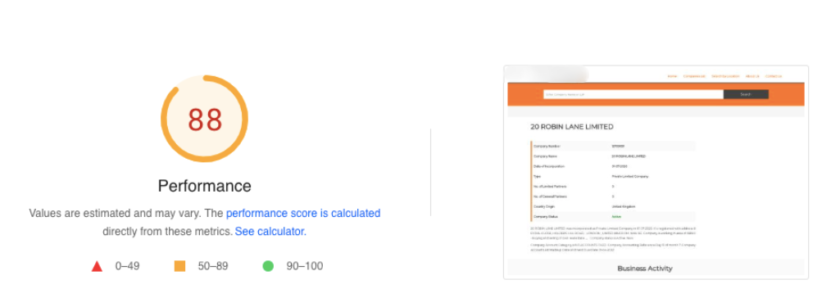
Test your website again using GTmetrix.com or Google PageSpeed Insights to see if the loading speed has increased by 70% to 80%.



Nidhi Maurya is a professional blogger and Content Writer who writes about a variety of topics related to his niche, including Web Tech, SEO, and digital marketing.