


In this tutorial, I’ll show you the basic procedure of how to zip and Download files using NodeJS.
For a web application, zipping multiple files and downloading is a key feature for any web developer or programmer. Assume you are developing functionality on a web application for zipping and downloading files using NodeJS. I will explain everything step by step in this article about how to zip and download files using NodeJS.
Before getting started, take a look at the file structure

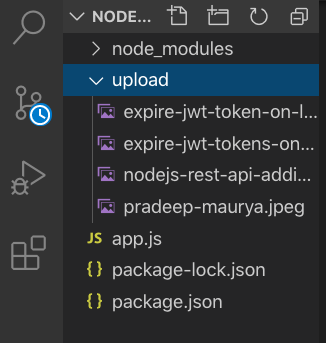
zip and Download files using NodeJS
REQUIREMENTS
Project Setup
For this project, we’ll be using the Node Express framework. You will, of course, need to have Node installed.
Create a directory for our project
mkdir zip-file-nodejs
Move into the directory
cd zip-file-nodejs
create a .json file that manages all the dependencies for our application
npm init
Now, install adm-zip, Express, and the other necessary dependencies
npm install express adm-zip body-parser nodemon
Now create an app.js file
const express = require('express')
const app = express()
const port = 9000

app.listen(port, ()=> console.log(Server started on port ${port}))
Create “upload” folder in root directory.
upload or add some files in “upload” folder to zip and download
adm-zip Configuration
Add the AdmZip object to your app.js file
const AdmZip = require('adm-zip');
Now copy and paste complete code to app.js file
const express = require('express')
// require fs package to read files
var fs = require('fs');
const app = express()
const port = 9000
const AdmZip = require('adm-zip');
var uploadDir = fs.readdirSync(__dirname+"/upload");

app.get('/', (req, res) => {

    const zip = new AdmZip();

    for(var i = 0; i < uploadDir.length;i++){
        zip.addLocalFile(__dirname+"/upload/"+uploadDir[i]);
    }

    // Define zip file name
    const downloadName = ${Date.now()}.zip;

    const data = zip.toBuffer();

    // save file zip in root directory
    zip.writeZip(__dirname+"/"+downloadName);

    // code to download zip file

    res.set('Content-Type','application/octet-stream');
    res.set('Content-Disposition',attachment; filename=${downloadName});
    res.set('Content-Length',data.length);
    res.send(data);

})

app.listen(port, () => console.log(Server started on port ${port}))
Now our code is ready for test.
Now open your terminal and run below command
node app.js
or
nodemon
After running node app.js. You will get message:
node app.js
Server started on port 9000
Now open http://localhost:9000/ in your browser
The zip file will store in your root directory and also auto-download the zip file to your local system.
Also Read: File Upload in Node js using Multer

Conclusion:
I hope you found this tutorial helpful for your project. Zip and Download files using NodeJS is an important feature for any web application. So here we are, completed the basic step using adm-zip in node.js and express.js
Are you want to get implementation help, or modify or extend the functionality of this script? Submit paid service request


Pradeep Maurya is the Professional Web Developer & Designer and the Founder of “Tutorials website”. He lives in Delhi and loves to be a self-dependent person. As an owner, he is trying his best to improve this platform day by day. His passion, dedication and quick decision making ability to stand apart from others. He’s an avid blogger and writes on the publications like Dzone, e27.co