



The Stripe Subscription API is a simple way to integrate recurring website payments For recurring billing, subscription payment is required if you want to implement the membership subscription system on the web application. The Stripe payment gateway allows you to integrate recurring payment with the APIs. Stripe subscription is a fast and efficient way for you to buy membership online with a credit card.
In the Stripe subscription payment, the buyer is recurringly charged on the basis of a specific period of time. Your website members will agree to a plan and make the payment without leaving the website with their credit/debit card. We will show you how to integrate Stripe subscription payment with PHP in this tutorial.
Take a look at the directory layout before you begin implementing Stripe Subscription Payment API in PHP.
stripe_subscription_payment_php/
├── dbconfig.php
├── index.php
├── payment.php
├── stripe-php/
Generate Stripe Test API Keys
You need the test API keys data to check the subscription payment process.
- Login to your Stripe account and navigate to the Developers » API keys page.
- In the TEST DATA block, you’ll see the API keys (Publishable key and Secret key) are listed under the Standard keys section. To show the Secret key, click on the Reveal test key token button.

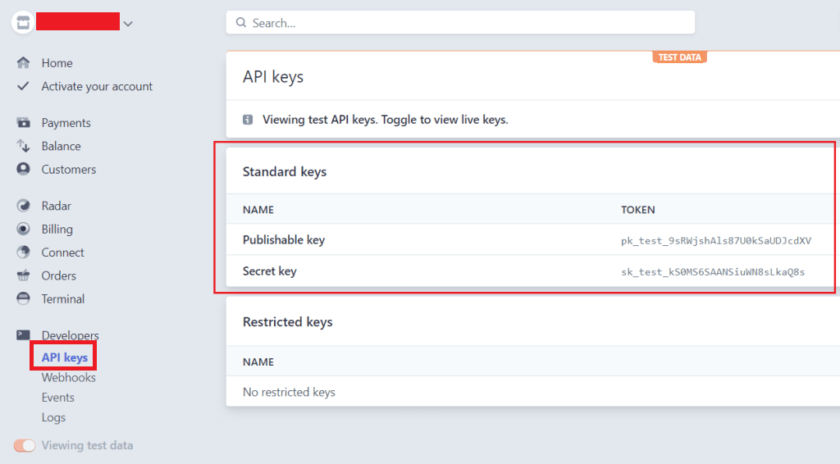
Copay and Paste the Publishable key and Secret key in your Notepad to use later in the script.
Download Stripe PHP Library
The Stripe PHP library is used to access the PHP Stripe API. It helps create customer, plan, and subscription to Stipre API. The required library files should be included in our source code.
Create Plans, Stripe API and Database Configuration (dbconfig.php)
 array(
        'name' => 'Weekly Subscription',
        'price' => 25,
        'interval' => 'week'
    ),
    '2' => array(
        'name' => 'Monthly Subscription',
        'price' => 80,
        'interval' => 'month'
    ),
    '3' => array(
        'name' => 'Yearly Subscription',
        'price' => 850,
        'interval' => 'year'
    )
);

//Currency code
$currency = "usd";

// Stripe API configuration
define('STRIPE_API_KEY', 'Your_API_Secret_key');  //STRIPE_API_KEY – Specify the API Secret key.
define('STRIPE_PUBLISHABLE_KEY', 'Your_API_Publishable_key'); //STRIPE_PUBLISHABLE_KEY – Specify the API Publishable key.

// Database configuration
define('DB_HOST', 'MySQL_Database_Host');
define('DB_USERNAME', 'MySQL_Database_Username');
define('DB_PASSWORD', 'MySQL_Database_Password');
define('DB_NAME', 'MySQL_Database_Name');

// Connect with the database
$db = new mysqli(DB_HOST, DB_USERNAME, DB_PASSWORD, DB_NAME);

// Display error if failed to connect
if ($db->connect_errno) {
    printf("Connect failed: %s\n", $db->connect_error);
    exit();
}
Note: Stripe API Secret key and Publishable key will be found in the API Keys Data section of your Stripe account.
Create Database Tables
Two tables are required in the database to store the member and subscription information.
1. The following SQL creates an users table to hold the member’s info in the MySQL database.
CREATE TABLEusers(idint(11) NOT NULL AUTO_INCREMENT,subscription_idint(11) NOT NULL DEFAULT '0',first_namevarchar(25) COLLATE utf8_unicode_ci NOT NULL,last_namevarchar(25) COLLATE utf8_unicode_ci NOT NULL,passwordvarchar(255) COLLATE utf8_unicode_ci NOT NULL,genderenum('Male','Female') COLLATE utf8_unicode_ci NOT NULL,phonevarchar(15) COLLATE utf8_unicode_ci NOT NULL,createddatetime NOT NULL,modifieddatetime NOT NULL,statusenum('1','0') COLLATE utf8_unicode_ci NOT NULL DEFAULT '1', PRIMARY KEY (id) ) ENGINE=InnoDB DEFAULT CHARSET=utf8 COLLATE=utf8_unicode_ci;
2. The following SQL creates a user_subscriptions_details table to hold the subscription info in the MySQL database.
CREATE TABLEuser_subscriptions_details(idint(11) NOT NULL AUTO_INCREMENT,user_idint(11) NOT NULL DEFAULT '0',payment_methodenum('stripe') COLLATE utf8_unicode_ci NOT NULL DEFAULT 'stripe',stripe_subscription_idvarchar(50) COLLATE utf8_unicode_ci NOT NULL,stripe_customer_idvarchar(50) COLLATE utf8_unicode_ci NOT NULL,stripe_plan_idvarchar(50) COLLATE utf8_unicode_ci NOT NULL,plan_amountfloat(10,2) NOT NULL,plan_amount_currencyvarchar(10) COLLATE utf8_unicode_ci NOT NULL,plan_intervalvarchar(10) COLLATE utf8_unicode_ci NOT NULL,plan_interval_counttinyint(2) NOT NULL,payer_emailvarchar(50) COLLATE utf8_unicode_ci NOT NULL,createddatetime NOT NULL,plan_period_startdatetime NOT NULL,plan_period_enddatetime NOT NULL,statusvarchar(50) COLLATE utf8_unicode_ci NOT NULL, PRIMARY KEY (id) ) ENGINE=InnoDB DEFAULT CHARSET=utf8 COLLATE=utf8_unicode_ci;
Create Stripe Subscription Form (index.php)
In the above code:
//Create Stripe Token and Validate Card with Stripe.js Library:
the Stripe.js library that helps securely sending sensitive information (credit card) to Stripe directly from the browser.
The following JavaScript code is used to generate a token with the Stripe.js library.
Process Subscription Payment (payment.php)
In this file, the submitted card details are validated and the subscription plan is activated with Stripe API using PHP.
- Get the logged-in user ID from the SESSION.
- Retrieve the token, selected plan, card details, and buyer info from the form fields using the PHP $_POST method.
- Fetch the plan details (name, price, and term) from the $plans array.
- Include the Stripe PHP library.
- Set API Secret key using setApiKey() method of Stripe class.
- Add the customer using
create()method of Stripe Customer API.- email – Buyer email
- source – Stripe token
- Create a plan using the
create()method of Stripe Plan API.- product – The product whose pricing the created plan will represent.
- product.name – Plan name.
- amount – A positive integer in cents (or 0 for a free plan) which will charge on a recurring basis.
- currency – Three-letter ISO currency code in lowercase.
- interval – Specify billing frequency (day, week, month or year).
- interval_count – The number of intervals between subscription billings. For example, interval=month and interval_count=2 bills every 2 months. Maximum of one year (1 year, 12 months, or 52 weeks) interval allowed.
- product – The product whose pricing the created plan will represent.
- Create a subscription using
create()method of Stripe Subscription API.- customer – The identifier of the customer to subscribe.
- items – List of the subscription plans.
- items.plan – Attach plan ID.
- If the plan and subscription creation are successful, retrieve transaction data. On successful activation,
- Insert the subscription information into the database.
- Attach the subscription reference ID to the respective member.
- Display subscription payment status on the webpage.
 $email,
        'source'  => $token
    ));

    // Convert price to cents
    $priceCents = round($planPrice*100);

    // Create a plan
    try {
        $plan = \Stripe\Plan::create(array(
            "product" => [
                "name" => $planName
            ],
            "amount" => $priceCents,
            "currency" => $currency,
            "interval" => $planInterval,
            "interval_count" => 1
        ));
    }catch(Exception $e) {
        $api_error = $e->getMessage();
    }

    if(empty($api_error) && $plan){
        // Creates a new subscription
        try {
            $subscription = \Stripe\Subscription::create(array(
                "customer" => $customer->id,
                "items" => array(
                    array(
                        "plan" => $plan->id,
                    ),
                ),
            ));
        }catch(Exception $e) {
            $api_error = $e->getMessage();
        }

        if(empty($api_error) && $subscription){
            // Retrieve subscription data
            $subsData = $subscription->jsonSerialize();

            // Check whether the subscription activation is successful
            if($subsData['status'] == 'active'){
                // Subscription info
                $subscrID = $subsData['id'];
                $custID = $subsData['customer'];
                $planID = $subsData['plan']['id'];
                $planAmount = ($subsData['plan']['amount']/100);
                $planCurrency = $subsData['plan']['currency'];
                $planinterval = $subsData['plan']['interval'];
                $planIntervalCount = $subsData['plan']['interval_count'];
                $created = date("Y-m-d H:i:s", $subsData['created']);
                $current_period_start = date("Y-m-d H:i:s", $subsData['current_period_start']);
                $current_period_end = date("Y-m-d H:i:s", $subsData['current_period_end']);
                $status = $subsData['status'];

                // Insert transaction data into the database
                $sql = "INSERT INTO user_subscriptions_details (user_id,stripe_subscription_id,stripe_customer_id,stripe_plan_id,plan_amount,plan_amount_currency,plan_interval,plan_interval_count,payer_email,created,plan_period_start,plan_period_end,status) VALUES('".$userID."','".$subscrID."','".$custID."','".$planID."','".$planAmount."','".$planCurrency."','".$planinterval."','".$planIntervalCount."','".$email."','".$created."','".$current_period_start."','".$current_period_end."','".$status."')";
                $insert = $db->query($sql);

                // Update subscription id in the users table
                if($insert && !empty($userID)){
                    $subscription_id = $db->insert_id;
                    $update = $db->query("UPDATE users SET subscription_id = {$subscription_id} WHERE id = {$userID}");
                }

                $ordStatus = 'success';
                $statusMsg = 'Your Subscription Payment has been Successful!';
            }else{
                $statusMsg = "Subscription activation failed!";
            }
        }else{
            $statusMsg = "Subscription creation failed! ".$api_error;
        }
    }else{
        $statusMsg = "Plan creation failed! ".$api_error;
    }
}else{
    $statusMsg = "Error on form submission, please try again.";
}
?>


            Payment Information
            Reference Number:
            Transaction ID:
            Amount:

            Subscription Information
            Plan Name:
            Amount:
            Plan Interval:
            Period Start:
            Period End:
            Status:


    Back to Subscription Page
Test Card Details
- 4242424242424242 – Visa
- 4000056655665556 – Visa (debit)
- 5555555555554444 – Mastercard
- 5200828282828210 – Mastercard (debit)
- 378282246310005 – American Express
- 6011111111111117 – Discover
Expiration date : 10/2021
CVC number : 123 (Any random number)
Make Stripe Payment Gateway Live
Follow the steps below to make Stripe payment gateway live once the subscription API integration is complete and the payment process works properly.
- Login to your Stripe account and navigate to the Developers » API keys page.
- Collect the API keys (Publishable key and Secret key) from the LIVE DATA section.
- In the
dbconfig.phpfile, replace the Test API keys (Publishable key and Secret key) by the Live API keys (Publishable key and Secret key).
SEE ALSO: How to Integrate Paypal Payment System with Paypal API in PHP and MySql
Conclusion
Stripe subscription payment API is the simplest way to accept online subscription credit payment. Using Stripe API and PHP, you can implement the recurring billing featured in the web application. Our example script allows you to periodically charge the user via Stripe at a specific interval. This Stripe payment script’s functionality can be enhanced as per your needs.
Are you want to get implementation help, or modify or extend the functionality of this script? Submit paid service request


Pradeep Maurya is the Professional Web Developer & Designer and the Founder of “Tutorials website”. He lives in Delhi and loves to be a self-dependent person. As an owner, he is trying his best to improve this platform day by day. His passion, dedication and quick decision making ability to stand apart from others. He’s an avid blogger and writes on the publications like Dzone, e27.co