



Blockonomics Bitcoin payment gateway is the only in the e-commerce industry to allow full decentralization. Purchases made on your website are sent to your account directly, rather than to a wallet for payment gateways. Not only does this save you fees when taking out your coins, but it also allows you to take ownership of your revenue without the need for a middle man. Never lose income from wallet hacks payment gateway-be your own bank!
Why Blockonomics bitcoin payment gateway?
The fastest and easiest way to start accepting Blockonomics Bitcoin payments on your online eCommerce website. Blockonomics has helped thousands of eCommerce sites increase sales since 2015, by including Bitcoin, Ethereum and Litecoin as their customers ‘ payment option.
In this article, I will explain to you how to integrate the Blockonomics payment gateway to accept bitcoin payment using PHP.
Step-1: Before starting first, create your merchant account with https://www.blockonomics.co/
Step-2: Create a Database Configuration file (dbconfig.php)
$host=DB_HOST;// localhost
$user= DB_USERNAME;
$pass= DB_PASSWORD;
$db= DB_NAME;
$con = mysqli_connect($host,$user,$pass,$db);
if(!$con)
{
die("Database connection error!");
}
Step-3: Create a database table to store transaction details
copy and paste the following MySQL database query script to create a ‘transaction_details’ table.
CREATE TABLEtransaction_details(trans_idint(255) NOT NULL,order_idint(255) NOT NULL,tnx_idlongtext,addresslongtext NOT NULL,valuevarchar(1000) NOT NULL,bitsvarchar(1000) NOT NULL,statusvarchar(1000) NOT NULL,created_ontimestamp NOT NULL DEFAULT CURRENT_TIMESTAMP ON UPDATE CURRENT_TIMESTAMP ) ENGINE=MyISAM DEFAULT CHARSET=latin1; ALTER TABLEtransaction_detailsADD PRIMARY KEY (trans_id); ALTER TABLEtransaction_detailsMODIFYtrans_idint(255) NOT NULL AUTO_INCREMENT, AUTO_INCREMENT=1;
In the above,
tnx_id = Transaction id,
address = Bitcoin payment address,
value= Total order amount in USD,
bits= Total order amount in bitcoin,
status = payment status (-1= pending, 2= success)
Step-4: Create your callback page (callback.php)
Copy and paste below code to update transaction status after payment.
transaction_details settnx_id='".$txid."',value='".$value."',status='".$status."' whereaddress='".$addr."' "); ?>
Step-5: Create Blockonomics Configurations file (blockConfig.php)
Copy and paste below Blockonomics Configurations code in blockConfig.php file
/*Blockonomics Configurations*/

$CALLBACK_SECRET = secret_key; // add your own secret key string, it will be same as you will use with your call back url later

$BASE_URL = 'https://www.blockonomics.co';
$NEW_ADDRESS_URL = $BASE_URL.'/api/new_address?match_callback='.$CALLBACK_SECRET;
$PRICE_URL = $BASE_URL.'/api/price?currency=USD';
$API_KEY = YOUR_API_KEY;
Step-6: How to get API_KEY and set Callback URL

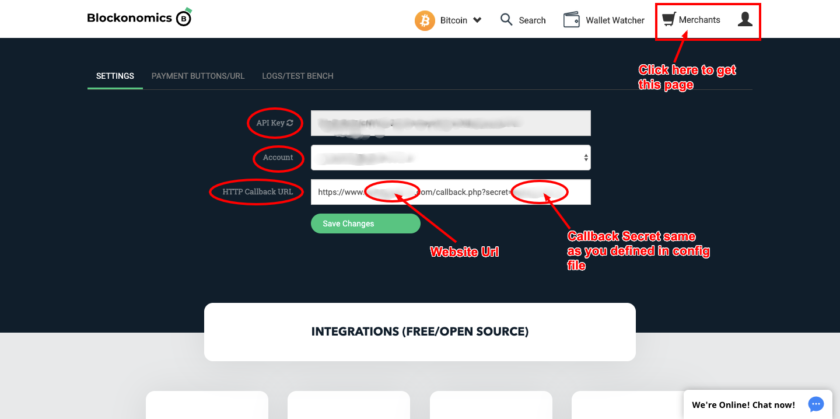
Callback URL should be like
https://www.tutorialswebsite.com/callback.php?secret=CALLBACK_SECRET

// CALLBACK_SECRET string should be same as you defined in blockConfig.php file
Step-7: Create a payment page (payment.php)
When your e-commerce website will process checkout then you need to store cart items details and customer details into the database. After inserting the order details, you need to get generated order id and pass generated order id and total order amount to payment.php file.
 array(
        'header'  => 'Authorization: Bearer '.$API_KEY,
        'method'  => 'POST',
        'content' => $data
    )
);

//Generate new address for this invoice
$context = stream_context_create($options);
$contents = file_get_contents($NEW_ADDRESS_URL, false, $context);
$new_address = json_decode($contents);

//Getting price
$options = array( 'http' => array( 'method'  => 'GET') );
$context = stream_context_create($options);
$contents = file_get_contents($PRICE_URL, false, $context);
$price = json_decode($contents);

if(isset($total_order_amount) && !empty($total_order_amount)){
$total_cost = $total_order_amount;
}else{
    header("Location:error.php");
}
//Total Cart value in bits
$bits = intval(1.0e8*$total_cost/$price->price);
$status=-1;

$tnx_query="select * from transaction_details where order_id='".$order_id."'";
         $tnx_orderitem=mysqli_query($con,$tnx_query );
         $getTnx=mysqli_fetch_array($tnx_orderitem);

        if(count($getTnx)==0){

$trans_insert=mysqli_query($con, "insert into transaction_details set order_id='".$order_id."',tnx_id='',
address='".$new_address->address."',value='".$total_cost."', bits='".$bits."',status='".$status."'");
}else{
     $trans_insert=mysqli_query($con, "UPDATE transaction_details set  address='".$new_address->address."', status='".$status."' where order_id='".$order_id."'
  ");
}


?>

          To pay, send exact amount of BTC to the given address

              Amount
       BTC ⇌  USD


      Bitcoin Address


