



In this article, I’ll show you how to create pagination with node js , MongoDB, Express.js, EJS, and Bootstrap. We will generate a new database, define data collection, fill this collection with information and display contents to the page using pagination.
Suppose we have a database that includes a lot of information (e.g. items) and we want to see everything on the website. We can only output items on the page, but it doesn’t look so good. We need pagination in such cases to display the results as a good format.
This post is generally designed for beginners who are involved in web development, so I will try to create all the explanations very detailed. But maybe this article will be helpful to an experienced developer.
Before start, you need to have Node.js, express.js, and MongoDB installed to read this post. You can download it from official websites and install it:
Node.js – https://nodejs.org/en/
See: How to Setup Environment to run node js code
See: How to install express
See: How to use mongoose with node.js
Get started by creating a fresh folder for this task and name it whatever you like. Then create additional folders and files within that directory to match the following structure:
.
├── routes
|    └── index.js
├── models
|    └── add_password.js
├── views
     ├── add-new-password.ejs
     |
     └── view-all-password.ejs
Open models/add_password.js file and copy and paste the following code to create schema and mongoose connection:
const mongoose = require('mongoose');
mongoose.connect('mongodb://localhost:27017/pms', {useNewUrlParser: true, useCreateIndex: true,});
var conn =mongoose.Collection;
var passSchema =new mongoose.Schema({
    password_category: {type:String,
        required: true,
        index: {
            unique: true,
        }},
        project_name: {type:String,
            required: true,
           },
        password_detail: {type:String,
            required: true,
           },
    date:{
        type: Date,
        default: Date.now }
});

var passModel = mongoose.model('password_details', passSchema);
module.exports=passModel;
In this file we create a connection to MongoDB, PMS is a database name and password_details is a collection name.
Open routes/index.js file and copy and paste the following code to create POST route and a new page with HTML form :
var express = require('express');
var router = express.Router();
var passModel = require('../modules/add_password');

router.get('/add-new-password',function(req, res, next) {
res.render('add-new-password');
  });

router.post('/add-new-password',function(req, res, next) {
var pass_cat= req.body.pass_cat;
var project_name= req.body.project_name;
var pass_details= req.body.pass_details;
var password_details= new passModel({
  password_category:pass_cat,
  project_name:project_name,
  password_detail:pass_details
});

  password_details.save(function(err,doc){

    res.render('add-new-password', { success:"Password Details Inserted Successfully"});

    });
    });
Let’s create views/add-new-password.ejs page with form to send a POST request to our POST route.
Open views/add-new-password.ejs file and paste following HTML:
Password Management System
Add New Password
Now you can run your MongoDB, then run a server with node index.js command and go to
http://localhost:3000/add-new-password
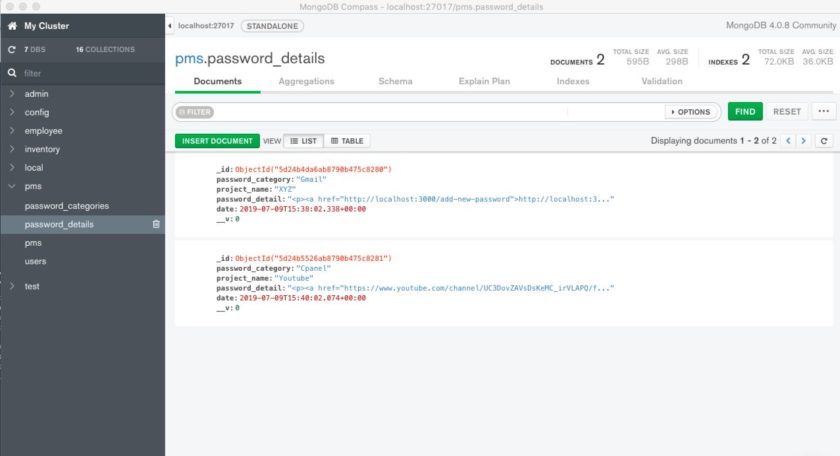
For easy viewing and editing of MongoDB content on your desktop, I suggested to use MongoDB Compass
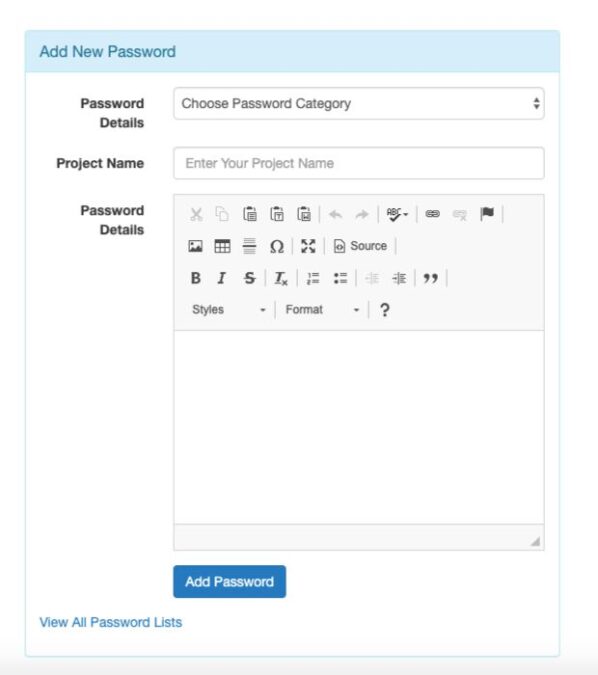
Add a new Password Details:

View in MongoDB Compass:

Output Password Details to Page with Pagination
First we need to create new route to render view-all-password page and output some necessary data to create pagination. Open routes/index.js file and paste following code:
router.get('/view-all-password/', function(req, res, next) {
    var perPage = 1;
      var page = req.params.page || 1;

    passModel.find({})
             .skip((perPage * page) - perPage)
             .limit(perPage).exec(function(err,data){
                  if(err) throw err;
            passModel.countDocuments({}).exec((err,count)=>{
    res.render('view-all-password', { records: data,
    current: page,
    pages: Math.ceil(count / perPage) });

  });
    });

  });

router.get('/view-all-password/:page', function(req, res, next) {
    var perPage = 1;
      var page = req.params.page || 1;

    passModel.find({})
             .skip((perPage * page) - perPage)
             .limit(perPage).exec(function(err,data){
                  if(err) throw err;
            passModel.countDocuments({}).exec((err,count)=>{
    res.render('view-all-password', { records: data,
    current: page,
    pages: Math.ceil(count / perPage) });

  });
    });

  });
Let me explain:
perPage variable contains max number of items on each page, page variable contains the current page number.
For each page, we need to skip ((perPage * page) – perPage) values (on the first page the value of the skip should be 0). output only perPage items as a limit.
Count all items in the collection with count() (we will use this value to calculate the number of pages
then render view-all-password page and send necessary data.
Create pagination with node js page:
Open views/view-all-password.ejs and paste following EJS:
Password Management System